
Selecting technology for elderly family members requires careful consideration of usability and simplicity. The right gadgets enhance independence, safety, and quality of life without creating frustration. However, complicated devices with frequent updates and troubleshooting needs often sit unused in closets.
Low-maintenance gadgets minimize technical difficulties while maximizing practical benefits. This guide helps caregivers and adult children choose appropriate technology that elderly users can operate confidently without constant assistance.
Understanding Low-Maintenance Technology Characteristics
Low-maintenance gadgets feature intuitive interfaces requiring minimal learning curves. Buttons should be clearly labeled with large text and simple icons. Additionally, devices should function reliably without frequent software updates or battery changes.
Durability matters significantly for elderly users who may struggle with delicate equipment. Robust construction withstands occasional drops and daily wear. Therefore, prioritize quality materials over trendy designs or excessive features.
Minimal setup requirements prevent frustration during initial use. Devices requiring extensive configuration, account creation, or wifi troubleshooting create immediate barriers. Moreover, gadgets that work straight from the box encourage adoption and sustained use.
Customer support availability provides essential backup when problems arise. Companies offering toll-free phone support with patient representatives serve elderly customers better than email-only or chatbot systems. However, truly low-maintenance devices rarely require support contacts.
Evaluating Physical Design and Accessibility Features
Large, clearly labeled buttons accommodate vision challenges and arthritis. Touch screens with adjustable text sizes suit some users better than tiny physical buttons. However, screens requiring precise tapping can frustrate those with tremors or coordination difficulties.
Weight and grip considerations affect daily usability significantly. Lightweight devices reduce strain but may feel flimsy or slip easily. Textured grips and ergonomic shapes help elderly hands maintain control during use.
Visual indicators like LED lights confirm device operation without requiring screen reading. Simple green and red lights communicate power status, charging needs, or alerts. Additionally, audio confirmations help users with vision impairments verify actions.
Minimal cord management reduces tripping hazards and confusion. Wireless charging eliminates fumbling with small connectors. Therefore, consider cordless options or devices with magnetic charging connections requiring simple placement.
Choosing Simplified Communication Devices
Large-button phones designed specifically for seniors offer essential features without smartphone complexity. Jitterbug phones include emergency buttons, hearing aid compatibility, and amplified sound. These devices maintain reliable cellular service without app updates or operating system changes.
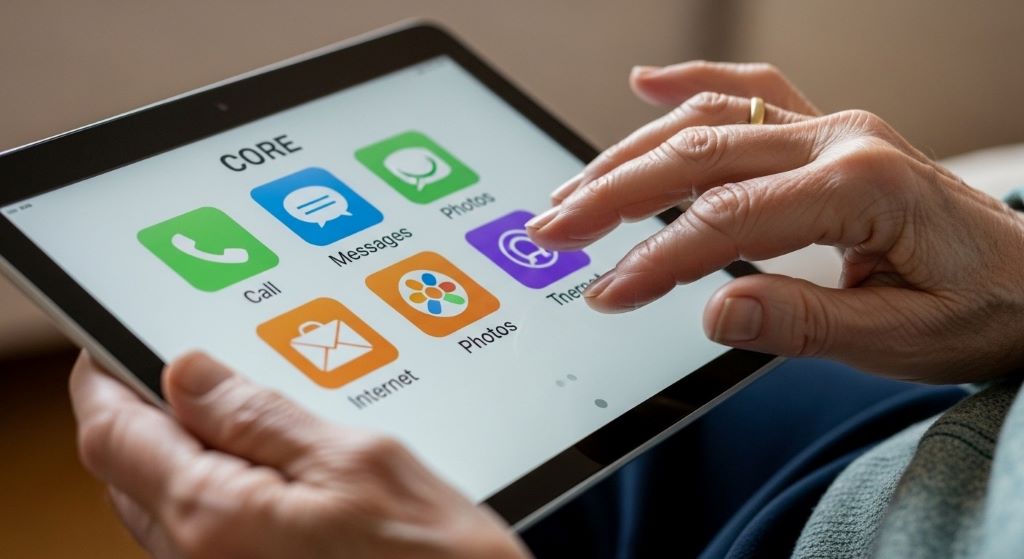
Simplified tablets like GrandPad come pre-configured with limited, curated functions. Family members manage settings remotely while users enjoy video calls, photos, and games. Moreover, these devices eliminate exposure to viruses, spam, and confusing app stores.
Voice-activated devices like Amazon Echo Show enable hands-free communication when properly set up. However, initial configuration requires technical assistance from family members. Once programmed with frequent contacts, seniors simply say names to make calls.
Video calling devices dedicated to single-function use eliminate navigation confusion. Facebook Portal focuses primarily on video calls with simple voice commands. Additionally, automatic framing keeps users centered during conversations without manual adjusting.
Selecting Safety and Health Monitoring Gadgets
Medical alert systems provide emergency assistance through wearable buttons. Modern systems like Life Alert and Medical Guardian require minimal interaction beyond wearing the device. Monthly monitoring fees include professional response services without device maintenance needs.
Fall detection watches automatically alert emergency contacts when detecting falls. Apple Watch SE and similar devices offer this feature alongside simple interfaces. However, regular charging remains necessary, typically every one to two days.
Medication dispensers with automatic alarms reduce missed doses and confusion. Hero and MedMinder organize pills by time and sound alerts when doses are due. Additionally, family members receive notifications if medications go untaken.
Blood pressure monitors with large displays and one-touch operation encourage regular health tracking. Omron and Withings models store readings automatically and sync with smartphone apps. Therefore, doctors can review trends without patients recording data manually.
According to AARP, the most successful technology for seniors combines simplicity with meaningful benefits that directly improve daily life and independence.
Finding User-Friendly Entertainment Options
E-readers like Kindle Paperwhite offer adjustable text sizes and long battery life. These devices hold thousands of books without physical storage needs. Moreover, built-in lighting enables comfortable reading without external lamps.
Simplified streaming devices pre-loaded with favorite services reduce navigation frustration. Roku Ultra with voice remote allows channel changes through speech. However, family members should configure accounts and parental controls during initial setup.
Digital photo frames that update automatically via wifi bring joy without technical interaction. Nixplay and Skylight frames receive photos sent by family members remotely. Additionally, these frames require only initial wifi setup and occasional charging.
Radio devices designed for seniors combine traditional AM/FM with streaming services. Roberts Revival RD70 features simple dial controls and Bluetooth connectivity. Therefore, users enjoy both familiar radio and modern music streaming.
Considering Smart Home Devices for Convenience
Voice-controlled light bulbs eliminate switch reaching and reduce fall risks. Philips Hue and LIFX bulbs respond to simple voice commands through smart speakers. However, initial setup requires installing bulbs and connecting to home networks.
Programmable thermostats with large displays and simple controls maintain comfort automatically. Lux programmable thermostats offer basic scheduling without smartphone apps. Additionally, family members can adjust settings during visits without complex interfaces.
Video doorbells allow elderly residents to see visitors without approaching doors. Ring Video Doorbell shows visitors on connected devices with two-way audio. Moreover, motion alerts notify users of package deliveries and activity.
Smart plugs convert regular lamps and appliances into voice-controlled devices. These simple adapters require only plugging in and brief setup. Therefore, existing familiar devices gain modern convenience without replacement costs.
Evaluating Battery Life and Power Requirements
Long battery life reduces charging frequency and associated frustration. Devices lasting weeks between charges suit elderly users better than daily charging requirements. Additionally, clear low-battery indicators prevent unexpected shutdowns.
Simple charging methods accommodate limited dexterity and vision. Magnetic connectors that snap into place work better than tiny USB ports requiring precise insertion. Wireless charging pads requiring simple placement offer even easier solutions.
Backup battery options prevent service interruptions during power outages. Medical alert systems with battery backup maintain emergency connectivity. Therefore, safety devices should include redundant power sources.
Solar-powered outdoor devices eliminate battery maintenance entirely. Motion-sensor lights and security cameras with solar panels require only occasional cleaning. However, adequate sunlight exposure remains necessary for reliable operation.
Reading Reviews from Actual Senior Users
Customer reviews from elderly users provide invaluable real-world insights. Search specifically for reviews mentioning age or senior-friendly features. Additionally, comments about setup difficulty and ongoing maintenance reveal potential challenges.
Family caregiver reviews often address practical support burdens. These reviews identify devices requiring frequent troubleshooting or assistance. Therefore, patterns of frustration indicate high-maintenance gadgets to avoid.
Professional reviews from senior-focused publications offer expert evaluations. AARP Technology and Senior Planet test devices specifically for elderly usability. Moreover, these sources understand unique needs like vision, hearing, and mobility considerations.
Return policies provide safety nets for unsuccessful gadget choices. Purchase from retailers offering generous return windows allowing adequate trial periods. However, keep packaging and receipts until confirming the device meets needs.
According to Consumer Reports, successful tech adoption among seniors depends more on thoughtful feature selection than advanced capabilities.
Avoiding Overly Complex Multi-Function Devices
Feature-loaded gadgets overwhelm users who need only basic functions. Smartphones with hundreds of apps confuse seniors requiring only calls and photos. Therefore, resist purchasing the most advanced options when simpler versions suffice.
Customizable devices requiring extensive personalization create setup barriers. Default settings should provide complete functionality without adjustments. Additionally, hidden settings menus prevent accidental changes disrupting familiar operations.
Subscription requirements and recurring fees complicate device ownership. Free-standing gadgets without mandatory monthly charges offer simpler long-term use. However, some services like medical monitoring justify subscription costs through valuable benefits.
Frequent software updates disrupt familiarity and introduce new confusion. Devices requiring manual update installations burden elderly users and caregivers. Moreover, automatic updates sometimes change interfaces unexpectedly.
Prioritizing Reliable Customer Service Options
Toll-free phone support with domestic representatives assists elderly users most effectively. Automated systems and offshore support centers often frustrate seniors needing patient assistance. Therefore, research company support quality before purchasing.
Extended warranties provide peace of mind for expensive assistive devices. Coverage including accidental damage proves especially valuable for users with coordination challenges. Additionally, replacement programs minimize downtime during repairs.
Local retailer availability enables in-person assistance and easy returns. Big-box stores with tech support desks can troubleshoot problems face-to-face. However, verify that staff members receive training on senior-specific devices.
Online tutorial resources should include video demonstrations with clear audio. Written manuals with large print and simple language help independent troubleshooting. Moreover, searchable FAQ databases address common questions quickly.
Testing Devices Before Purchasing When Possible
In-store demonstrations allow hands-on evaluation before buying. Bring elderly recipients when possible to assess comfort and understanding. Additionally, store staff can demonstrate features and answer specific questions.
Borrowing from friends or family provides risk-free trial experiences. Testing identical devices in familiar home environments reveals practical usability. Therefore, ask fellow caregivers about gadgets they’ve successfully implemented.
Return policies offering full refunds within 30 days enable home trials. Test devices thoroughly during this period, including setup processes. However, document any difficulties encountered for informed purchase decisions.
Rental programs for medical equipment allow extended trials before purchasing. Some medical supply companies offer monthly rentals applied toward purchase prices. Moreover, this approach prevents expensive mistakes with costly assistive technology.
Implementing Gradual Technology Introduction
Introduce one device at a time to prevent overwhelming elderly users. Master basic operations before adding additional gadgets. Additionally, success with simple devices builds confidence for more complex technology.
Provide written instructions with large print and step-by-step photographs. Laminated quick-reference cards beside devices serve as helpful reminders. Therefore, users can troubleshoot independently without calling for help.
Schedule regular check-ins to address questions and reinforce training. Brief weekly calls or visits prevent small problems from causing device abandonment. Moreover, ongoing support demonstrates patience and encouragement.
Celebrate successful technology use to reinforce positive experiences. Acknowledge independence gained through gadget adoption. However, avoid pressuring resistant users who genuinely prefer traditional methods.
Conclusion
Choosing gadgets for elderly users with low maintenance needs requires prioritizing simplicity, durability, and practical benefits over advanced features. Successful devices feature intuitive interfaces, long battery life, reliable customer support, and minimal setup requirements. Therefore, thoughtful selection focusing on specific needs rather than technological trends creates positive experiences. By evaluating physical accessibility, reading senior-specific reviews, and allowing trial periods, caregivers can identify gadgets that genuinely enhance independence and quality of life. The goal remains empowering elderly users through appropriate technology rather than creating additional frustration or dependence on technical assistance.
Frequently Asked Questions
What are the most important features to look for in gadgets for elderly users?
Large buttons, clear displays, simple interfaces, and long battery life rank as top priorities. Devices should work reliably without frequent updates or troubleshooting. Additionally, toll-free customer support and straightforward setup processes significantly improve success rates.
Are smartphones too complicated for elderly people?
Standard smartphones can overwhelm some elderly users, but simplified versions exist specifically for seniors. Jitterbug and similar phones offer essential features without app stores or complex menus. However, some tech-savvy seniors handle regular smartphones successfully with proper training.
How can I reduce the maintenance burden of gadgets for elderly relatives?
Choose devices with automatic updates, long battery life, and remote management capabilities. Set up gadgets completely before gifting them, pre-programming contacts and settings. Additionally, select products with excellent customer support for issues beyond your expertise.
What safety gadgets require the least maintenance for elderly users?
Medical alert pendants with monthly monitoring services require only wearing and occasional charging. Fall detection watches and automatic medication dispensers need minimal interaction beyond regular use. However, verify backup battery systems for critical safety devices.
Should I buy the latest technology or proven older models for elderly users?
Proven older models often provide better reliability and simpler interfaces than cutting-edge gadgets. Established products have refined customer support and solved early technical problems. Therefore, prioritize reliability and ease-of-use over newest features or trendy designs.
Related Topics:
How To Use Walkie Talkie On Apple Watch: Mastering Walkie-Talkie Communication
Galaxy Watch Active 2 Blood Pressure: Monitor Your Health Easily