
You hit record, lay down what feels like a great vocal take, and play it back. The headphone bleed is all over it. That click track bleeding through into the microphone turned your intimate vocal performance into something unusable. Or worse—you didn’t hear the bleed during recording, only discovered it during mixing when removing it meant re-recording the entire session.
This isn’t a microphone problem or a room problem. It’s a headphone problem. Consumer headphones and open-back monitoring cans leak sound outward like tiny speakers — and sensitive condenser microphones pick up every decibel of that leakage. In a professional studio with thick isolation and distant mic placement, it’s manageable. In a home studio where the mic is 6 inches from your face? It’s catastrophic.
Recording headphones have one non-negotiable job: let you hear your backing track, click, and cue mix clearly while keeping every drop of that sound inside the ear cups and away from the microphone. Beyond isolation, they need to inspire performance — delivering a mix that makes you play or sing your best. This guide covers everything home recording musicians need to know about choosing the right tracking headphones.
Why Can’t You Just Use Any Headphones for Recording?
Recording (tracking) places unique demands that listening, mixing, and editing headphones aren’t designed to meet:
Sound isolation is critical: During recording, a live microphone captures everything in the room — including sound escaping from your headphones. The condenser microphones used for vocals are especially sensitive, picking up headphone leakage from several feet away. Even small amounts of bleed create phase cancellation issues, audible click track artifacts, and reduced mix flexibility in post-production.
Volume needs are higher: Musicians recording need to hear the backing track clearly over their own instrument or voice. A drummer needs to hear the click above acoustic drums. A vocalist needs the backing track present but not overwhelmingly loud. Recording headphones must achieve sufficient volume without distortion at high levels and without excessive leakage.
Comfort during performance: Unlike editing (where you’re stationary at a desk), recording involves physical movement — singing with expression, playing guitar, drumming with full body engagement. Headphones must stay in place during movement, not restrict jaw movement (important for vocalists), and remain comfortable even during energetic takes.
Durability under studio conditions: Recording sessions involve frequent on/off cycles, cable stretching as musicians move, exposure to sweat during intense performances, and occasional drops from mic stands. Recording headphones need robust construction that survives daily studio use for years.
What Specifications Make Great Recording Headphones?
Here’s what separates recording-appropriate headphones from everything else:
Isolation (Most Critical)
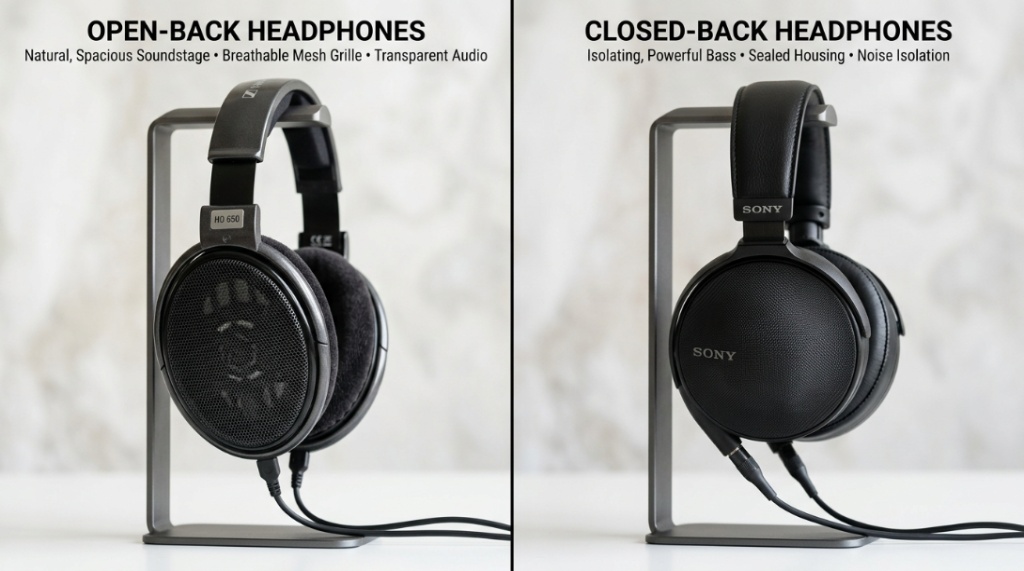
Minimum 18 dB of passive noise isolation (measured as sound leakage from inside to outside). Premium recording headphones achieve 25-32 dB. This means: fully sealed (closed-back) ear cups, dense ear pad material that creates an airtight seal, and drivers that direct sound inward rather than radiating outward.
Test method: Put the headphones on a table, play music at your normal monitoring volume, hold your phone’s microphone 6 inches away. If you can clearly hear the music in the phone recording, the headphones leak too much for microphone-adjacent recording.
Comfort That Doesn’t Restrict Performance
For vocalists: ear cups must not press against the jaw or restrict mouth opening. The headband shouldn’t create pressure that affects head/neck movement. Lightweight designs (under 270g) prevent fatigue during long sessions with multiple takes.
For instrumentalists: secure fit that stays put during physical movement. Drummers need extra-secure clamping (they move aggressively). Guitarists need cups that don’t interfere with strap placement. Pianists need minimal cable restriction for arm movement.
Sound Quality (Important but Secondary to Isolation)
Recording headphones don’t need mastering-grade neutrality. They need an enjoyable, clear mix that inspires good performances. A slight bass warmth can help vocalists feel the groove. Enhanced mid-presence helps musicians hear themselves clearly in dense arrangements. Perfect flatness is a mixing requirement, not a recording one.
Single-Sided Cable
Cables that attach to only one ear cup (rather than a Y-split to both) prevent tangling with mic stands, instrument cables, and music stands. This small design choice makes a significant practical difference during active recording sessions. Detachable cables add longevity since studio cables take abuse.
| Recording Scenario | Isolation Priority | Comfort Priority | Sound Character | Top Recommendation |
|---|---|---|---|---|
| Vocal Recording | ★★★★★ (critical) | ★★★★☆ (jaw freedom) | Warm, present mids | Beyerdynamic DT 770 Pro |
| Acoustic Guitar | ★★★★☆ (important) | ★★★☆☆ (seated, stable) | Balanced, clear highs | Audio-Technica ATH-M50x |
| Electric Guitar (DI/Amp sim) | ★★★☆☆ (moderate) | ★★★★☆ (long sessions) | Engaging, full range | Sony MDR-7506 |
| Drums | ★★★★★ (extreme noise) | ★★★★★ (physical playing) | Punchy, loud enough | Sennheiser HD 280 Pro |
| Bass Guitar (DI) | ★★★☆☆ (no mic nearby) | ★★★★☆ (extended wear) | Extended low-end | Audio-Technica ATH-M40x |
Which Recording Headphones Are Best for Home Studios?
These models are proven in recording environments and match home studio budgets:
Best Overall for Home Recording: Beyerdynamic DT 770 Pro (80 Ohm) — $150-170
The DT 770 Pro has been a recording studio standard for decades — and for good reason. Isolation is exceptional (25+ dB), comfort is all-day-ready thanks to velour pads and lightweight construction, and the sound character is musical enough to inspire great performances while being accurate enough for rough mixing decisions between takes.
The 80-ohm version drives well from any audio interface without needing a dedicated headphone amp — perfect for home studios. The single-sided coiled cable handles studio movement without tangling, and Beyerdynamic sells replacement parts (pads, cables, headband) extending lifespan to 10+ years.
Best Budget: Sony MDR-7506 — $80-100
The broadcast and recording industry standard since 1991. Found in virtually every professional studio on earth as tracking headphones. Isolation is good (not exceptional), comfort is acceptable for 1-2 hour sessions, and the slightly forward upper-midrange makes vocals and instruments cut through backing tracks clearly. Foldable for compact storage. Incredibly durable — the same pair often lasts 5-8 years of daily studio use.
Best Isolation: Sennheiser HD 280 Pro — $80-100
32 dB of passive isolation — the highest in this price range. If leakage prevention is your absolute #1 priority (loud backing tracks, very sensitive microphones, minimal distance between headphones and mic), the HD 280 Pro is unmatched. Sound is clinical and flat — less “inspiring” than warmer alternatives but extremely honest. Ideal for sessions where isolation trumps enjoyment.
Best for Vocalists: Audio-Technica ATH-M50x — $130-160
Vocalists often prefer a bit more bass and “vibe” in their monitoring mix — it helps them feel the groove and deliver more emotional performances. The M50x delivers this with a subtle low-end warmth and present midrange that makes vocals feel full and supported. Isolation is very good, comfort is solid (though the pleather pads can get warm), and the swiveling ear cups make single-ear monitoring easy.
Best for Drummers: Direct Sound EX-29 — $80-100
Specifically designed for extreme noise environments. 29 dB isolation with extra-deep ear cups that accommodate the drummer’s head movement. Secure fit that won’t slide during aggressive playing. Sound quality is secondary to isolation and durability at this price — but for drummers who need to hear the click above an acoustic kit, these deliver where others fail.
How Do You Set Up a Proper Recording Headphone Mix?
Having great home studio headphones means nothing without a proper cue mix. The monitoring mix a musician hears during recording directly affects performance quality:
Vocalist cue mix essentials:
- Their own voice: slightly above the backing track, with a touch of reverb for comfort (dry monitoring feels unnatural and causes pitch issues)
- Click track: present but not dominant — felt more than heard
- Backing track: full but 3-6 dB below the vocal for clarity
- Total volume: moderate (70-80 dB) — loud enough to hear clearly, quiet enough to prevent vocal straining
Instrumentalist cue mix essentials:
- Their own instrument: prominent, slightly above the mix
- Click/drums: strong and clear (timing reference)
- Bass: present (provides harmonic foundation)
- Other instruments: reduced to essential harmonic/rhythmic reference
- Total volume: adjusted to instrument volume (drummers need louder headphones than acoustic guitarists)
The “more me” principle: Every musician wants more of themselves in their headphones. This is natural and correct — hearing yourself clearly produces better performances. Most audio interfaces offer zero-latency direct monitoring that blends live input with DAW playback, letting musicians hear themselves without delay.
How Does Latency Affect Recording Headphone Choice?
Latency (the delay between playing/singing and hearing yourself in the headphones) is one of the most critical factors in home recording comfort:
Acceptable latency: Under 10ms feels “live” — most musicians can’t perceive delay below this threshold. 10-20ms is noticeable but workable. Above 20ms actively disrupts performance timing.
How headphones relate to latency: The headphones themselves add zero latency — delay comes from the audio interface and DAW. However, headphone impedance affects how interfaces handle monitoring. Low-impedance headphones (32-80 ohms) work with the direct monitoring circuits of budget interfaces that bypass DAW latency entirely. High-impedance headphones may require the headphone amp to work harder, potentially introducing noise that masks the direct monitoring signal.
Solution for home studios: Use your interface’s direct monitoring (hardware monitoring) during recording. This routes input directly to headphone output with sub-1ms latency regardless of DAW buffer settings. Then use DAW monitoring only during playback/editing. Recording headphones with low impedance (32-80 ohms) ensure this direct monitoring path works optimally.
What About Recording Multiple Musicians with One Set of Headphones?
Home studios recording bands or duos face the headphone multiplication challenge:
Headphone distribution amplifiers ($50-200): Devices like the Behringer HA400 ($25) or ART HeadAmp4 ($60) split one headphone output into 4-8 individual outputs, each with independent volume control. This lets every musician set their own level without affecting others.
Mixing identical models: When multiple musicians use the same headphone model, they hear the same tonal character — making communication about mix issues easier. “The bass is too loud” means the same thing to everyone. Mixed headphone models create different perceptions of the same mix.
Budget approach: Buy 2-3 pairs of the same affordable recording headphones (Sony MDR-7506 at $80 each) rather than one expensive pair. Consistency across all musicians matters more than individual premium quality for home recording sessions.
If you’re comparing options for a multi-headphone studio setup, this resource on top Sennheiser headphones covers models that work exceptionally well in both solo and ensemble recording environments.
How Do You Maintain Recording Headphones for Maximum Lifespan?
Studio headphones face unique stresses — here’s how to maximize your investment:
- Replace ear pads every 12-18 months: Sweat, skin oils, and compression degrade pads faster in recording environments (more physical activity = more moisture). Degraded pads reduce isolation — which is the primary function during recording. Fresh pads restore full seal and comfort.
- Store on a stand, not hung by one cup: Asymmetric hanging warps headband spring tension over time. A proper stand maintains even pressure distribution.
- Wipe down after sweaty sessions: Vocalists and drummers generate significant perspiration. Quick wipe with a slightly damp cloth after each session prevents salt buildup that degrades pad material and headband padding.
- Coil cables loosely: Never wrap cables tightly around the headphones. Loose over-under coils prevent internal wire fatigue that causes intermittent connection issues.
- Keep spare cables: If your model supports detachable cables, keep a backup. Cable failure during a session with a visiting musician is expensive lost time.
Common Recording Headphone Mistakes That Ruin Home Studio Sessions
- Using open-back headphones for tracking: Sound leaks directly into the microphone. Even “semi-open” designs leak enough to be problematic with sensitive condensers at close range. Always fully closed-back for recording with live microphones.
- Monitoring too loudly: Cranking headphone volume to “hear everything” causes: faster ear fatigue, vocal straining (singing louder to match perceived volume), increased leakage risk, and hearing damage over time. Keep levels moderate.
- No reverb in vocal monitoring: Singing into completely dry headphone monitoring feels unnatural and claustrophobic, causing pitch issues and tentative performances. Add a light reverb to the vocal monitoring mix (just monitoring, not recorded) for natural comfort.
- Ignoring cable noise: Cheap cables and loose connections create handling noise (microphonic cable) that transfers through the headphones and distracts performers. Quality cables with strain relief and secure connections eliminate this.
- One headphone for recording AND mixing: Possible but suboptimal. Recording headphones are optimized for isolation and inspire performance; mixing headphones are optimized for accuracy and analytical listening. If budget forces one pair, the Beyerdynamic DT 770 Pro bridges both needs best.
- Forgetting comfort’s performance impact: Uncomfortable headphones = tense musicians = worse performances. A vocalist grimacing from headphone pressure doesn’t deliver emotional, relaxed vocals. Comfort directly affects recording quality.
FAQ
What’s the difference between recording headphones and mixing headphones?
Recording headphones prioritize: isolation (preventing bleed), comfortable fit during performance, durable construction for studio use, and a musical sound that inspires good takes. Mixing headphones prioritize: flat frequency response (revealing truth), wide soundstage (spatial accuracy), and analytical detail for making mix decisions. Closed-back dominates recording; open-back dominates mixing.
Can I record vocals with AirPods or wireless earbuds?
Technically possible but strongly not recommended. Wireless earbuds add Bluetooth latency (20-200ms depending on codec), leak significant sound at close range, have no flat frequency response for monitoring, and disconnection mid-take is common. Wired closed-back headphones eliminate all of these issues for reliable recording sessions.
Do I need different headphones for recording different instruments?
Not necessarily — one good closed-back pair handles all recording situations. However, specific cases benefit from specialization: drummers need maximum isolation (playing is loud), vocalists benefit from lightweight comfort (jaw freedom), and bass players benefit from extended low-end response. If budget allows only one pair, general-purpose closed-backs like the DT 770 Pro cover everything adequately.
How loud should recording headphones be during tracking?
70-80 dB SPL at the ear — roughly “comfortable conversation volume.” Loud enough to hear all elements of your cue mix clearly, quiet enough to prevent vocal straining, fatigue, or significant sound leakage. If you need to remove headphones to hear someone speaking normally in the room, you’re monitoring too loudly.
Why do I hear a delay when recording through my headphones?
This is audio interface/DAW latency — the time it takes for your signal to enter the interface, pass through the computer, and return to headphones. Fix: enable “direct monitoring” or “zero-latency monitoring” on your interface. This routes your input directly to headphone output bypassing the computer entirely. The headphones themselves add zero delay.
Are expensive recording headphones worth it for a home studio?
The practical ceiling for home recording headphones is $150-200. Beyond this, you get marginally better isolation, comfort, and sound quality — but the difference between $150 and $400 is far less impactful for recording than for mixing. A $150 Beyerdynamic DT 770 Pro delivers 95% of the recording performance of headphones costing three times more.
How many pairs of headphones does a home studio actually need?
Minimum: one quality closed-back pair for recording and basic editing. Ideal: one closed-back for recording + one open-back for mixing/editing. For band recording: add 2-3 additional closed-backs for musicians. Most home studios operate excellently with two pairs total — the budget split should be roughly 60% to the mixing pair and 40% to the recording pair.
If you are looking to upgrade your tracking setup, getting the right monitoring gear is absolutely critical to hearing your mix accurately. While studio monitors are great, a solid pair of cans is your first line of defense against mic bleed and background noise. To make sure you pick the right pair for your specific setup, check out our complete guide on How to Choose Headphones for Recording Music at Home to find the perfect balance of comfort, isolation, and frequency accuracy.
Key Takeaways
- ✅ Recording headphones must be closed-back with 18+ dB isolation — sound leakage into microphones is the #1 problem they solve
- ✅ The Beyerdynamic DT 770 Pro (80 Ohm) at $150 is the gold standard home studio recording headphone — proven across decades of professional use
- ✅ Comfort directly affects performance quality — uncomfortable headphones produce tense, worse recordings
- ✅ Use direct/hardware monitoring on your interface to eliminate latency during recording (headphones add zero delay)
- ✅ Budget ceiling for recording headphones is $150-200—beyond this, returns diminish rapidly for tracking purposes